ASISTENCIAS.EXE · Attendance with QR and official reports

PROJECT 04 / 11 · Web

Attendance for clinical placements

A web system for a public health institution that records nursing students’ attendance at their hospital placements: QR scanning or manual entry, and the monthly and annual reports in the institution’s official format, ready to print.

  • In production
  • Web · installable
  • 2026
In production NEXT.JS 16 · SUPABASE · DOCX · QR
01 / IMAGES.DIR

Project overview.

The app works with real student data, so the real one stays untouched. These screenshots come from a copy I ran on my laptop with its own local database and made-up students, sites and attendance; the badge in front of the camera is a test one too. The last two are crops of reports the system generated during testing, without the official header, the student’s details or the signatures.

IMAGES.DIR
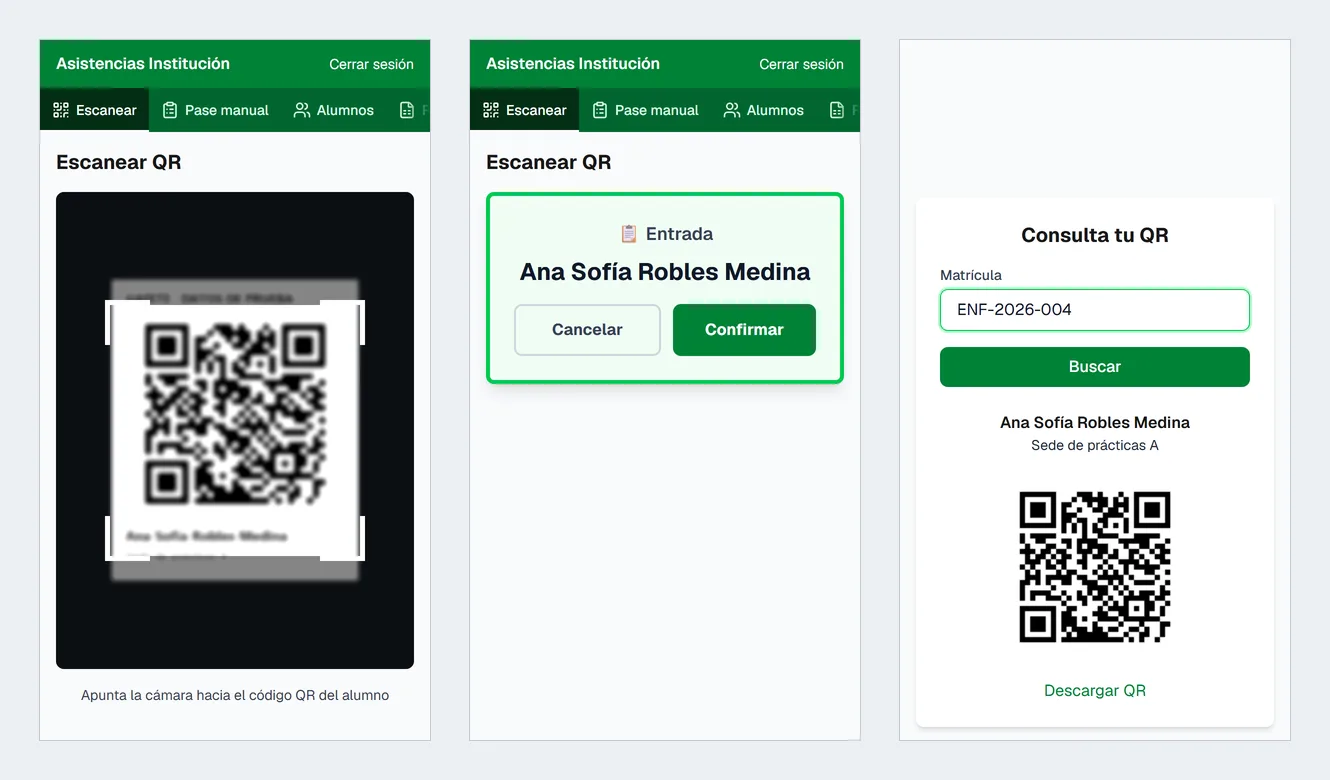
On the phone: the camera points at the badge, the app recognises the student and asks to confirm check-in; on the right, the public lookup where each student gets their QR back with their student ID (opens in a new tab)
On the phone: the camera points at the badge, the app recognises the student and asks to confirm check-in; on the right, the public lookup where each student gets their QR back with their student ID
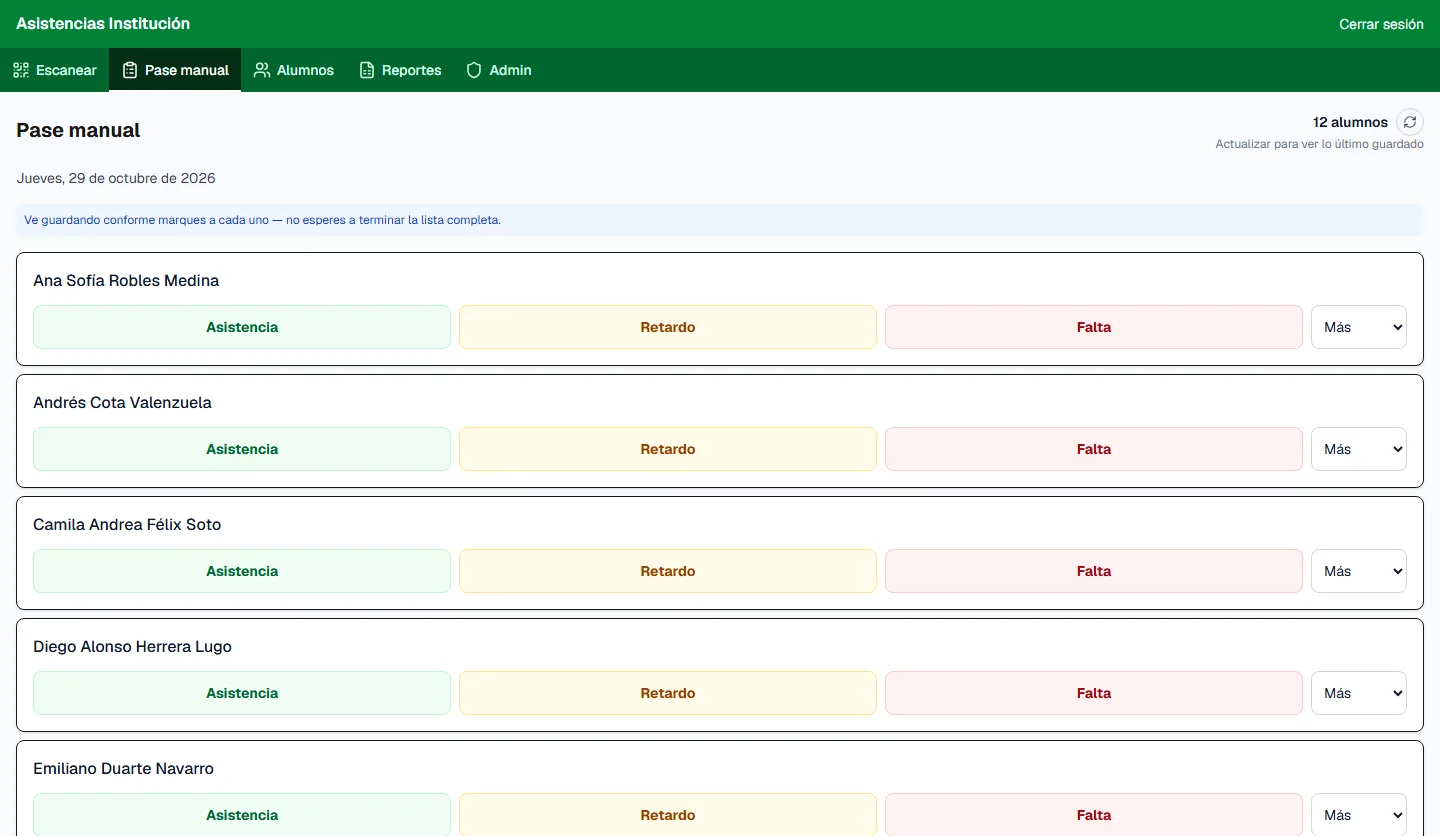
Manual roll call: present, late or absent in one tap, and the other categories (excused absence, sick leave, vacation, rest…) under “More”; it saves as you go (opens in a new tab)
Manual roll call: present, late or absent in one tap, and the other categories (excused absence, sick leave, vacation, rest…) under “More”; it saves as you go
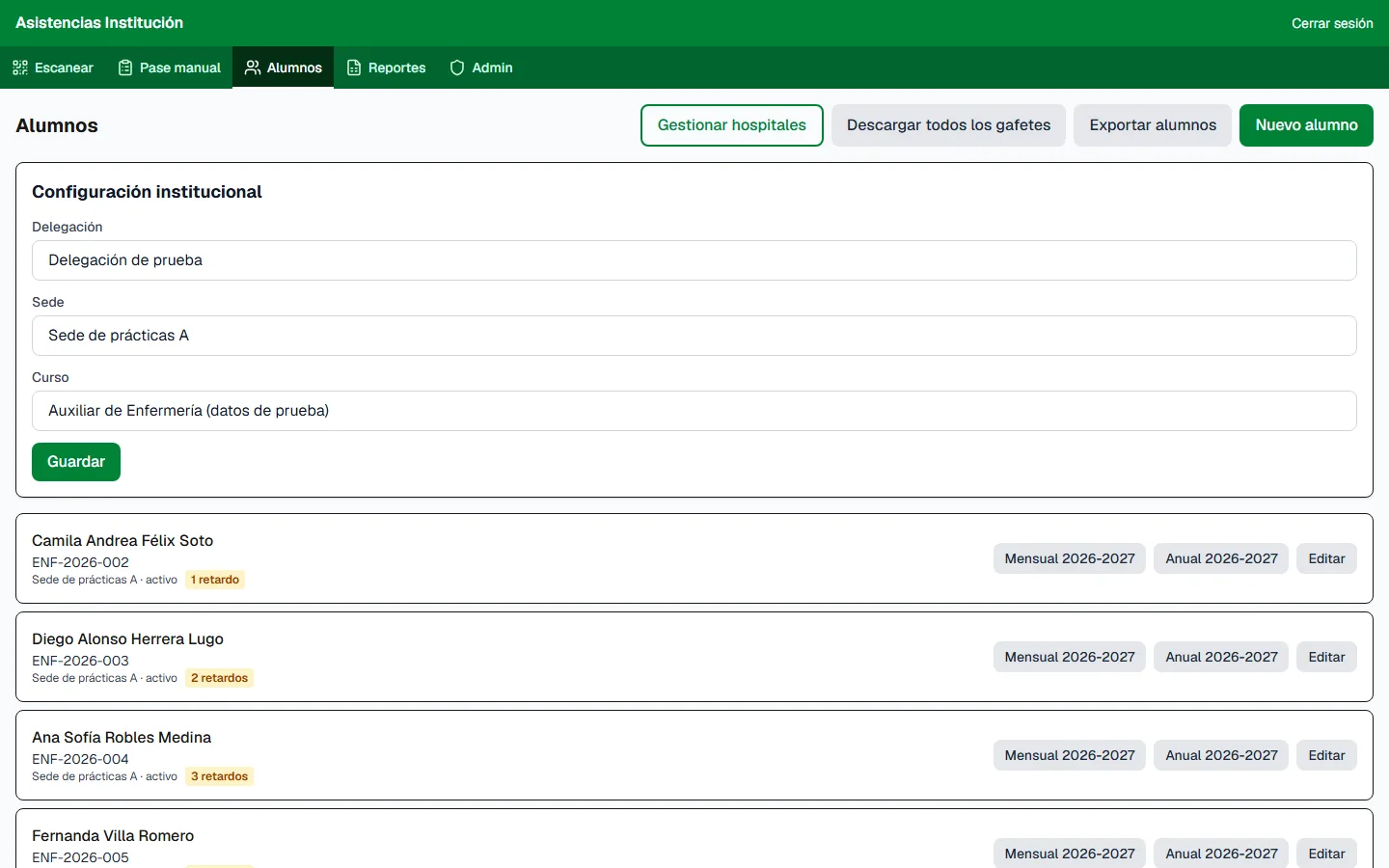
Students: site and course settings, and each student with their lates and their monthly and annual reports one click away (opens in a new tab)
Students: site and course settings, and each student with their lates and their monthly and annual reports one click away
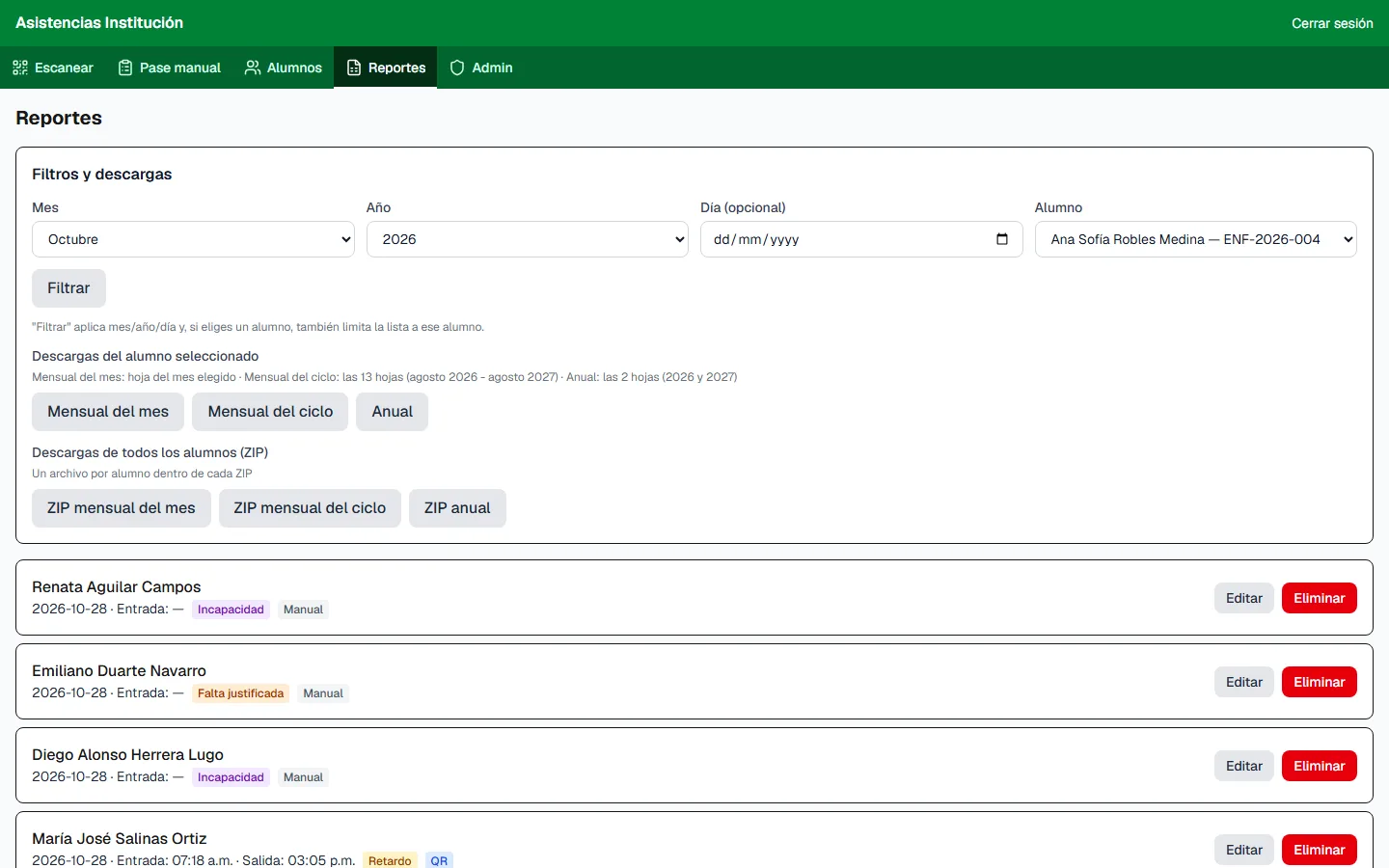
Reports: filters by month, year, day and student, downloads per student or for everyone as a ZIP, and the records with their source (QR or manual) to edit or delete (opens in a new tab)
Reports: filters by month, year, day and student, downloads per student or for everyone as a ZIP, and the records with their source (QR or manual) to edit or delete
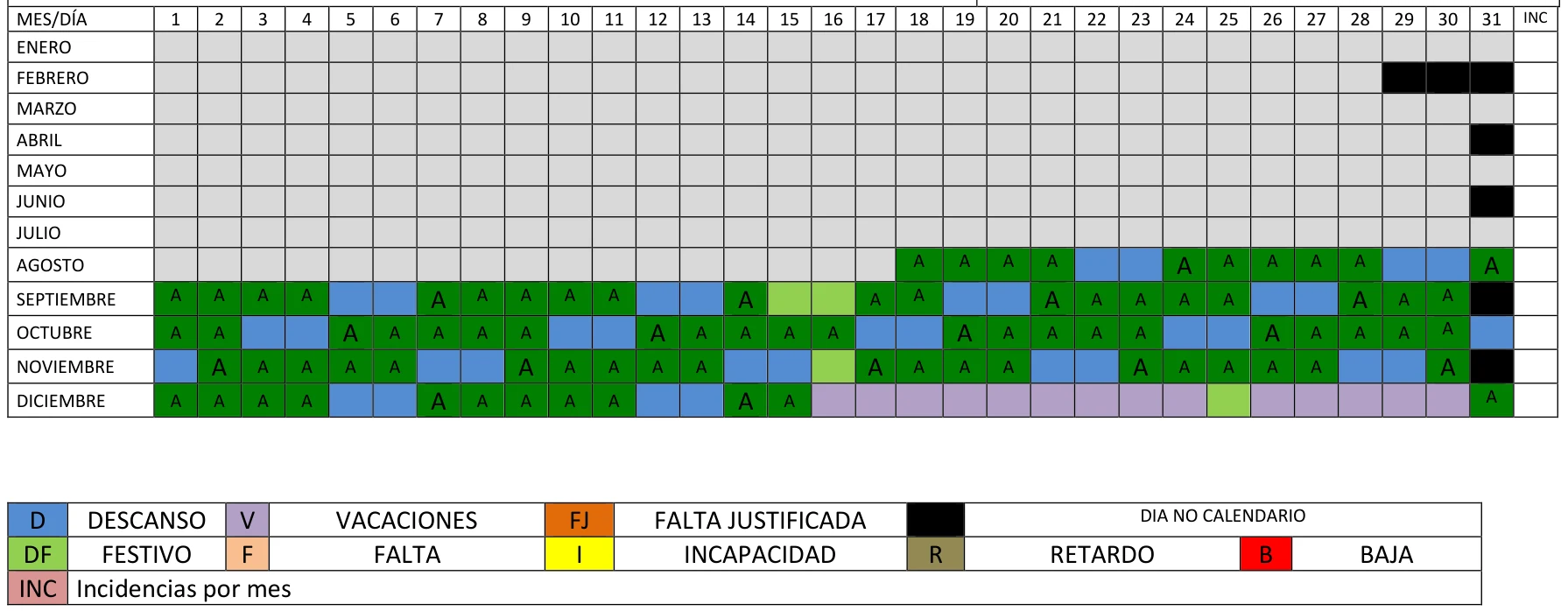
Annual report: every day of the year by colour code (attendance, rest, public holidays, vacation, absences, sick leave) (opens in a new tab)
Annual report: every day of the year by colour code (attendance, rest, public holidays, vacation, absences, sick leave)
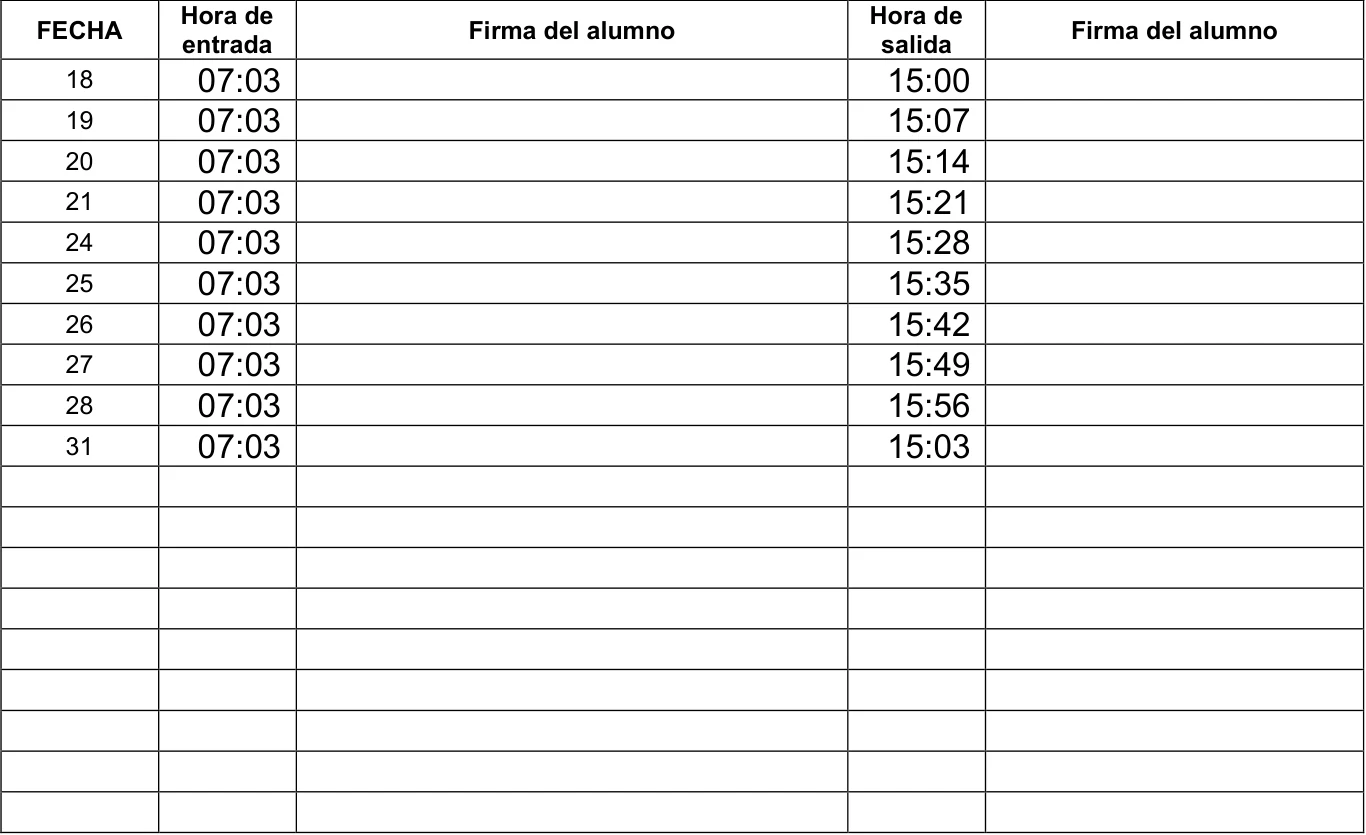
Monthly control: check-in and check-out times per day, in the format the institution prints and signs (opens in a new tab)
Monthly control: check-in and check-out times per day, in the format the institution prints and signs
Local copy with made-up data · test reports

02 / STACK.INI

Tech stack.

What each piece does in this project. Hover over a tool, tap it or tab into the list to light it up.

  • Next.js 16App Router: admin panel, public lookup and API routes
  • TypeScriptTyped models for students, sites and attendance
  • SupabaseAdmin sign-in and PostgreSQL with row-level security
  • Tailwind CSSInterface designed for phones on site
  • docxtemplaterMonthly and annual reports on the official Word templates
  • jsPDF · QRCodeStudent badges with their QR code, in PDF
  • html5-qrcodeScanning badges with the phone camera
  • Vercel · SentryHosting, deploys and error monitoring

03 / README.TXT

About the project.

README.TXT

Problem

Attendance at the hospital placements was kept on paper and the official monthly and annual formats were filled in by hand for each student: slow work, easy to get wrong and hard to check.

Solution

Each student carries a badge with a QR code; the coordinator scans it with her phone, or records it manually, and the system produces the official reports from what was recorded, in the institution’s own format.

Key features

  1. Scan or manual entryAttendance by scanning the badge’s QR, or a manual roll call with categories such as absence, justified absence, sick leave or rest.
  2. Official reportsThe monthly control and the annual report come out in the institution’s Word format, ready to print and sign.
  3. Badges in PDFEach student’s badge with its QR code, generated from the system.
  4. Roles and securityA super administrator, coordinators for daily use and students without an account, protected by row-level security in the database.
  5. Public lookupStudents check their own record by typing their enrolment number, without signing in.

Before each release, dozens of test reports were generated and checked against the institution’s real format, including edge cases such as a whole month of absences or very long names.

Ready UTF-8 · LF · 28 L

04 / ARCHITECTURE.SYS

How it works.

Components and data flow, taken from the source code.

ARCHITECTURE.SYS

ON SITE

  • Coordinator’s phoneScan or manual entry
  • StudentLookup by enrolment number

VERCEL · NEXT.JS 16

  • Web appPanel, lookup and API
  • Report generatorWord templates and PDF

DATA

  • SupabasePostgreSQL with row-level security
Architecture diagram — From the scan at the hospital to the printed report: the phone, the app on Vercel and the database.

Data flow, step by step

  1. The coordinator opens the panel on her phone and scans the badge, or does the manual roll call.
  2. The app records the attendance with its site and time; the database rules decide who can write.
  3. At the end of the month or the year, the generator fills the official Word templates with what was recorded.
  4. The coordinator downloads, prints and signs the reports; students check their record with their enrolment number.

Engineering notes

  • The official format, not a lookalikeReports are built on the institution’s own Word templates, so they can be printed and signed as they are.
  • A snapshot of the siteEach attendance keeps the site it was taken at, so a later change of hospital doesn’t rewrite past reports.
  • Security by roleRow-level security in PostgreSQL: coordinators work with their students; only the super administrator manages sites and accounts.
  • Tested at the edgesSimulated full cycles, months with only absences or sick leave and very long names, before every release.

05 / PROPERTIES.CPL

Project properties.

PROPERTIES.CPL · Clinical placement attendance system

Platform
Web — Next.js on Vercel, installable on the phone
Type
Attendance and official reports
Status
In production
Year
2026First commit: July 2026
My role
Design and full-stack development
Built for
A public health institution (name withheld)
Repository
PrivateHandles real student data

06 / LINKS.LNK