CONOCIMIENTO.MD · Personal AI assistant for an executive

PROJECT 02 / 11 · AI · Desktop

Knowledge management with AI

A personal AI assistant for an executive, installed on his own computer. It brings his notes, agenda and to-dos together in a knowledge base that AI can query, and connects it to his sports watch, market prices and social media.

  • Delivered · v1.0
  • Windows
  • 2026
Delivered · v1.0 OBSIDIAN · CLAUDE CODE · PYTHON
01 / IMAGES.DIR

Project overview.

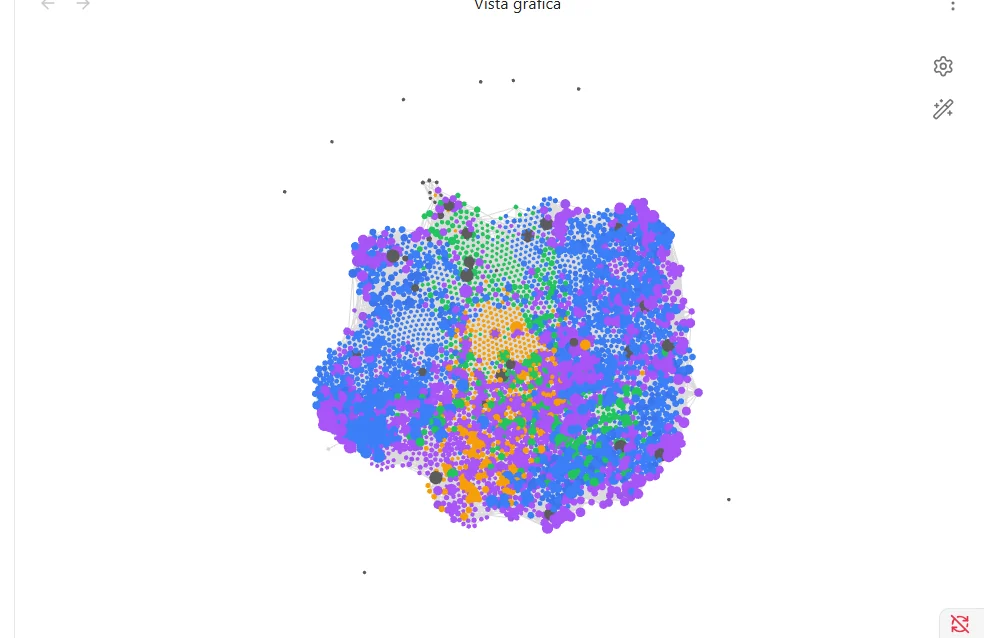
The first image is the graph of his real vault, with no note names visible. The rest come from the lab where I tested each feature before delivering it, with made-up data; the client’s name is covered.

IMAGES.DIR
The graph of his vault: thousands of notes and their links, coloured by area (opens in a new tab)
The graph of his vault: thousands of notes and their links, coloured by area
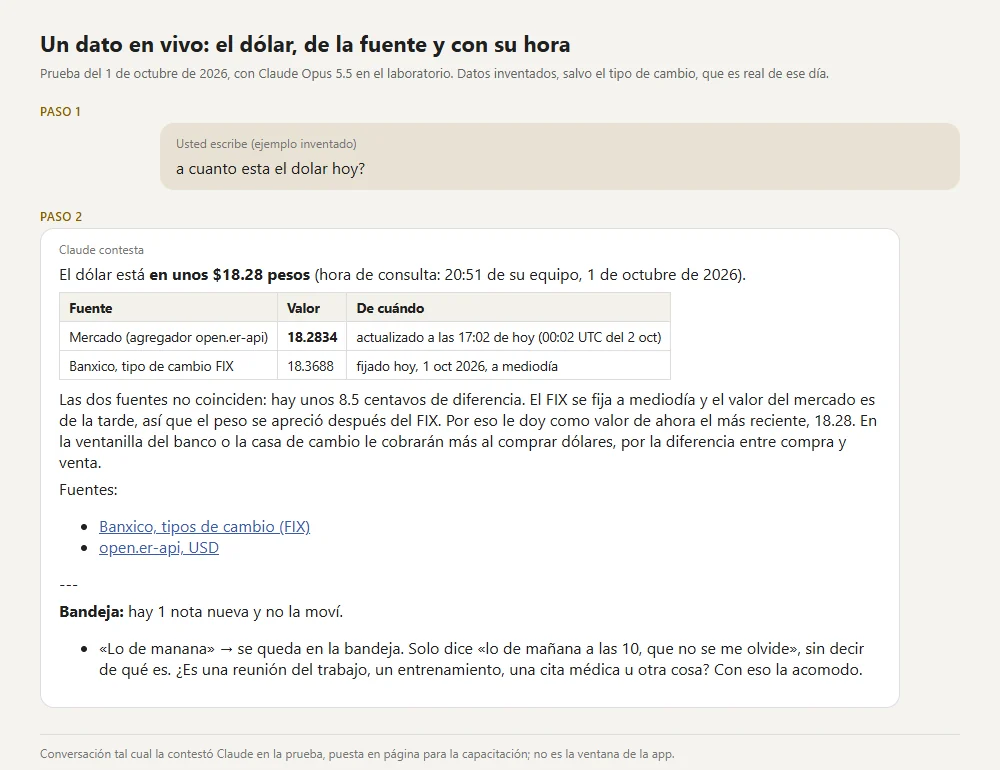
Live data: the exchange rate, with its source and time (opens in a new tab)
Live data: the exchange rate, with its source and time
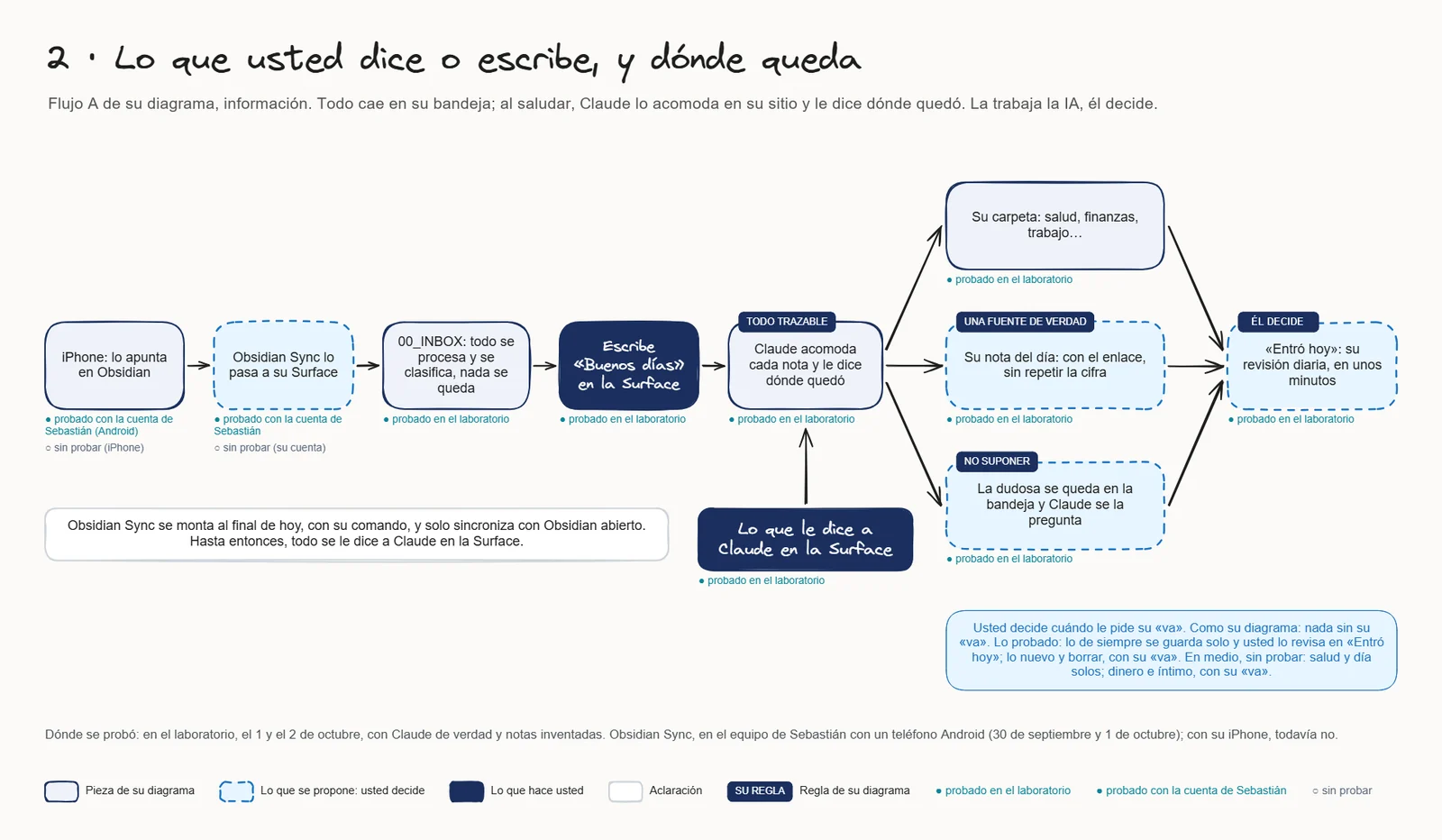
How a note travels from his phone to its place, from the training material (opens in a new tab)
How a note travels from his phone to its place, from the training material
Real graph without names · lab screenshots with made-up data

02 / STACK.INI

Tech stack.

What each piece does in this project. Hover over a tool, tap it or tab into the list to light it up.

  • ObsidianThe knowledge base: Markdown notes on his computer, synced with his phone
  • Claude CodeThe assistant that files, reads and answers from the vault
  • PythonInstaller, connectors and automated tests
  • Git · GitHubVersions, delivery and a GitHub Projects board
  • Intervals.icuActivity from his sports watch
  • CoinGecko · BanxicoLive prices, each with its source and time
  • BufferLinkedIn posts, published only after his approval
  • VirtualBoxVirtual machines to test every delivery first

03 / README.TXT

About the project.

README.TXT

Problem

An executive’s information lives scattered: notes on the phone, to-dos in his head, data across several apps. Finding something or knowing what is pending takes time, and the personal shouldn’t mix with work.

Solution

An Obsidian vault on his computer where everything lands in an inbox. When he says good morning, Claude files each note in its place and tells him where it went; what it doesn’t know, it asks. Routine things are saved on their own; anything new, personal or about money waits for his go-ahead.

Key features

  1. An inbox that files itselfEach note goes to its folder and area, keeps a link in the day’s note and shows up in the daily “Came in today” review.
  2. Live data with its sourceExchange rate and market prices come from the source, with the time of the query; nothing is made up.
  3. His watch, in his vaultTraining and recovery from his sports watch arrive through Intervals.icu, in his health area.
  4. LinkedIn with his approvalClaude drafts, he approves and Buffer publishes; nothing personal or financial goes into a post.
  5. Installer and trainingA double-click Windows installer that tests the system on his computer, plus diagrams and screenshots to teach him how to use it.

Designed in phases with the client, from diagnosis to delivery; each version was tested on virtual machines before reaching his computer.

Ready UTF-8 · LF · 28 L

04 / ARCHITECTURE.SYS

How it works.

Components and flow, as they ended up in version 1.0.

ARCHITECTURE.SYS

HIS PHONE

  • ObsidianHe jots down notes

HIS COMPUTER

  • Obsidian vaultInbox, areas and the day’s note
  • Claude CodeFiles, reads and answers

SOURCES

  • Intervals.icuHis sports watch
  • CoinGecko · BanxicoLive prices
  • BufferLinkedIn, with his OK
Architecture diagram — From the note on his phone to the answer: his phone, his computer and the outside sources.

Data flow, step by step

  1. He jots something down in Obsidian on his phone, or simply tells Claude.
  2. Obsidian Sync brings it to the inbox of the vault on his computer.
  3. When he says good morning, Claude files each note and tells him where it went.
  4. If he asks for a figure, Claude reads it from its source, with the time of the query.
  5. He reviews the day in “Came in today” and decides what is still open.

Engineering notes

  • He decidesAI does the work, he decides: deleting, new routines and new projects wait for his go-ahead.
  • Nothing made upEvery figure comes with its source and time; if two sources disagree, it says so.
  • The personal stays apartHealth, money and personal notes live in their own areas and never go into a LinkedIn post.
  • Tested before deliveryEvery version ran on a virtual machine first, with screenshots as evidence.

05 / PROPERTIES.CPL

Project properties.

PROPERTIES.CPL · AI knowledge management system

Platform
Windows, with Obsidian
Type
Personal AI assistant · client project
Status
Version 1.0 delivered
Year
2026From August to October 2026
My role
Design, development, testing and training
Built for
An executive (name withheld)
Repository
PrivateThe client’s system isn’t public

06 / LINKS.LNK