PLATAFORMA.EXE · Team workspace where AI assistants connect through MCP

PROJECT 03 / 11 · Web · AI

A workspace with AI assistants

A workspace I built from scratch, at zero cost, for a research team: kanban board, documents, chat, proposals with voting and news. Each member’s AI assistant connects through MCP and works on the same data as its person; cards are never deleted, they get archived.

  • In daily use
  • Web
  • 2026
In daily use REACT 19 · SUPABASE · CLOUDFLARE · MCP
01 / IMAGES.DIR

Project overview.

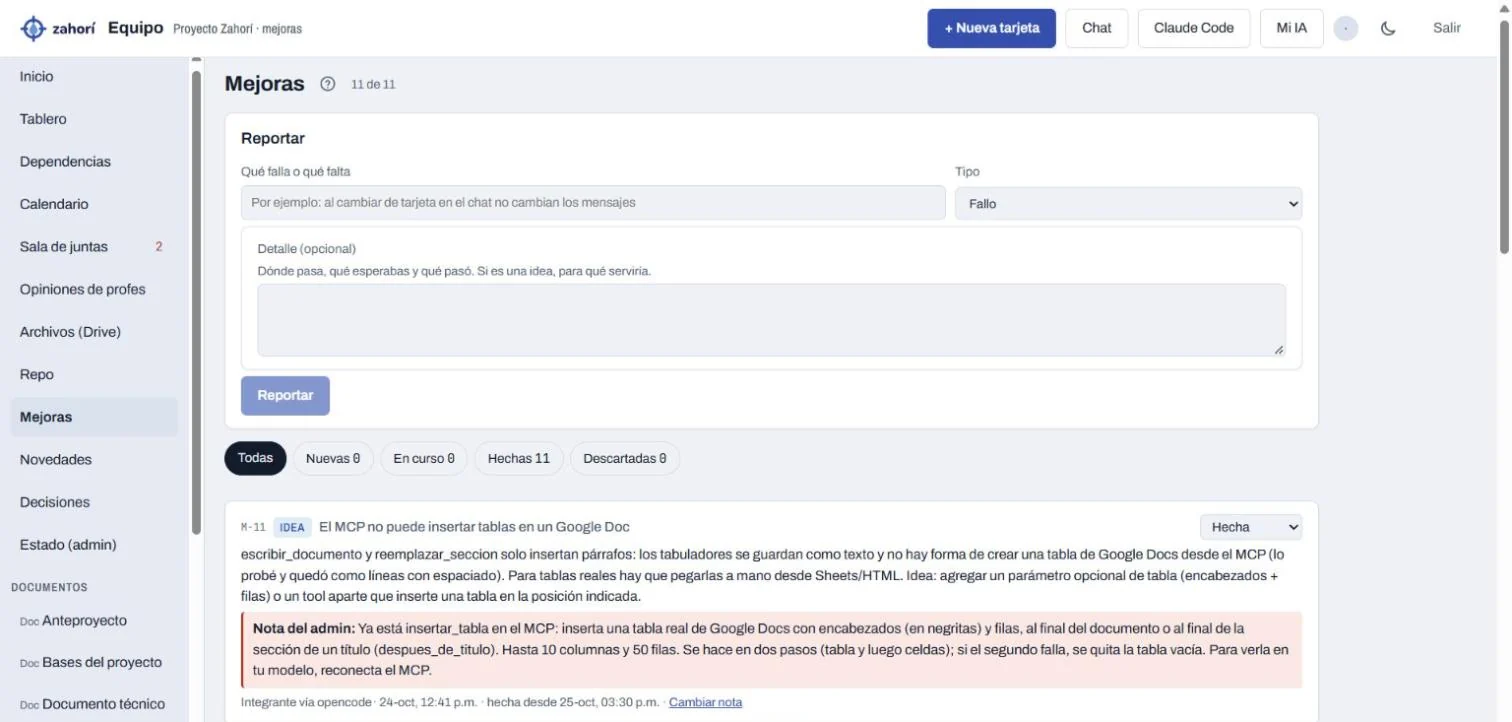
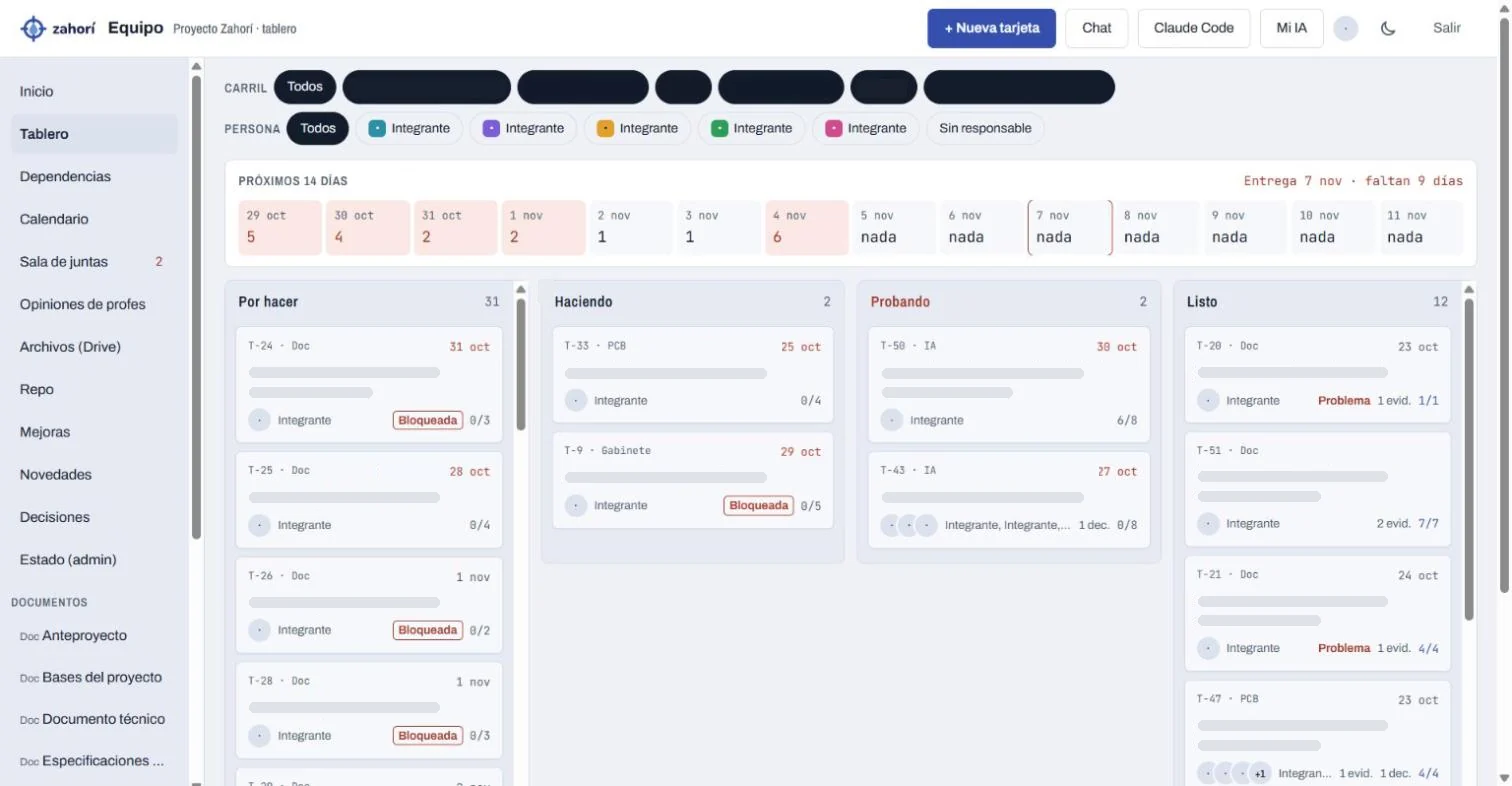
Screenshots of the live platform. Members’ names, initials and the team name were covered before capturing; afterwards the images were retouched to hide card titles, lanes and status marks. Nothing in the platform was changed.

IMAGES.DIR
The board: lanes, a strip of the next 14 days and cards with their owner, criteria and evidence (titles covered) (opens in a new tab)
The board: lanes, a strip of the next 14 days and cards with their owner, criteria and evidence (titles covered)
Improvements reported from a member’s AI through MCP, and the admin’s note when they are fixed (opens in a new tab)
Improvements reported from a member’s AI through MCP, and the admin’s note when they are fixed
Real screenshots · names and titles covered

02 / STACK.INI

Tech stack.

What each piece does in this project. Hover over a tool, tap it or tab into the list to light it up.

  • React 19The app: board, documents, chat and the other views
  • TypeScriptThe app and the MCP server, both typed
  • SupabasePostgreSQL database, Google sign-in and live updates
  • PostgreSQLRow-level security: what each role can read, write or remove
  • Cloudflare WorkersHosts the app and the remote MCP server
  • Model Context ProtocolEach member’s AI reads the board and documents and proposes changes
  • Google Drive APITeam documents, editable from the platform and from the AIs
  • Claude CodeDevelopment and reviews, with a pre-commit hook that blocks secrets

03 / README.TXT

About the project.

README.TXT

Problem

A five-person team with a hard deadline was coordinating in a group chat: tasks got lost, documents lived in several places, and each member used a different AI that knew nothing about the project.

Solution

A single workspace with the board, documents, chat, decisions and news, plus an MCP server so every member’s AI works on the same project data. The AIs create and move cards, write in documents and report improvements; every AI change to a document keeps a copy first.

Key features

  1. Board with evidenceKanban by phase with owners, due dates and criteria; a card only reaches Done when someone other than its owner tests it.
  2. Each member’s AI, connected39 MCP tools: the assistants read and update the board and documents, write summaries, report improvements and vote on proposals.
  3. Documents in one placeThe team’s Google Docs open inside the platform, with a backup copy before every change made by an AI.
  4. Proposals and decisionsTopics to discuss, votes, a meeting room and a decision log, so what was agreed doesn’t get reopened.
  5. Advisers insideA role for teachers to leave feedback, which each member’s AI summarises when they start working.

Built and put into use in days, during the challenge itself; every change went through review and a check that blocks secrets before reaching the repository.

Ready UTF-8 · LF · 28 L

04 / ARCHITECTURE.SYS

How it works.

Components and data flow, taken from the source code.

ARCHITECTURE.SYS

PEOPLE AND THEIR AIs

  • Team and advisersIn the browser, with Google
  • Each member’s AIClaude, opencode and others

CLOUDFLARE WORKERS

  • Web appReact 19 · TypeScript
  • MCP server39 tools, one token per person

DATA

  • SupabasePostgreSQL with access rules
  • Google DriveTeam documents
Architecture diagram — People and their AIs work on the same data: the web app and the MCP server, both on Cloudflare.

Data flow, step by step

  1. A member signs in with Google and works on the board, the documents or the chat.
  2. Their AI connects to the MCP server with its own token and reads the same project data.
  3. The AI writes summaries, reports improvements or proposes changes; before touching a document, a backup copy is saved.
  4. The database rules decide what each role can do; cards are archived, never deleted.
  5. Changes show up live for everyone, people and AIs alike.

Engineering notes

  • Cards are archivedCards are never deleted, they are archived. In documents, every AI change saves a copy first so it can be restored.
  • One token per personThe MCP server holds no admin key: it uses the public key and each person’s own token, and the database checks that token in every function.
  • No secrets in the repositoryA pre-commit hook stops any commit that contains something that looks like a key.
  • Zero costEverything runs on free plans (Cloudflare Workers and Supabase), so the team pays nothing to use it.

05 / PROPERTIES.CPL

Project properties.

PROPERTIES.CPL · Collaborative platform with AI assistants

Platform
Web — Cloudflare Workers
Type
Team workspace + MCP server
Status
In daily use by the team and its advisers
Year
2026First commit: 18 October 2026
My role
Design and full-stack development
Built for
My research team · University of Sonora
Repository
PrivateHolds the team’s work

06 / LINKS.LNK